
AutoStandByPro
Free forever · No trial · No license key
Stop your PC sleeping
only when it actually matters
only when it actually matters
AutoStandByPro watches for the things that should keep your computer awake — Plex streaming, downloads, backups — and lets it sleep the rest of the time.
Every way to decide "stay awake"
Four trigger categories, mixed and matched into rules that fit how you actually use your PC.
👤
User
No activity, mouse or keyboard idle, or a specific process running
🖥
Computer
CPU, disk & network thresholds, display state, services, reachable machines
🕑
Time-Based
A specific date, after a set time of day, or a recurring schedule
PLUS
⚡
Advanced
HTTP checks, power requests, and day/time profile scheduling
Every rule, in one place
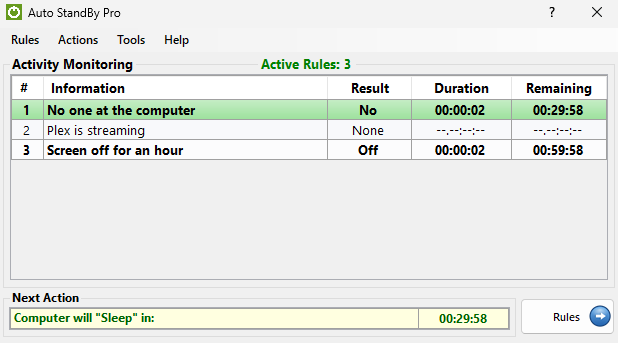
No hidden config files. Build a rule, see it live, and know exactly why your PC is awake or asleep.
✓
Free core triggers, forever
✓
No scripts or scheduled tasks to babysit
✓
Runs quietly in the background
PLUS
Want the advanced triggers too?
HTTP checks, power requests, day/time profile scheduling, and cross-session background monitoring — one license, up to 5 computers.
Common questions
Is it really free forever?
Yes. No trial period, no license key, no feature countdown. The core triggers cover the common cases — don't sleep while Plex is streaming or a download is running — for free, indefinitely.
What does Plus actually add?
Advanced triggers (HTTP checks, power requests), day/time profile scheduling, and a background service that detects activity across every Windows session on the machine, not just yours. See the full Free vs Plus comparison.
Where can I get more help?
The Help Center covers setup, rules, profiles, and troubleshooting in detail.
© 2026 Phenomenal Solutions — AutoStandByPro