Triggers
A trigger is a certain condition within a Rule that has to be met before the corresponding Action of that rule is executed. In order to choose a condition for a rule, first open the "Rule Creation" window by Creating/Modifying a rule and from section 2 select one of the supported triggers.
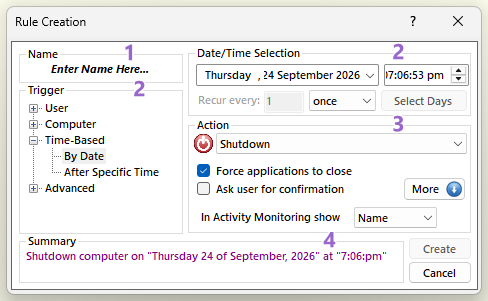
In the "Rule Creation" window there are four categories of triggers to choose from:
- User
In this category the conditions are related to the user activities of the user account that is currently running AutoStandByPro (with “Global User Activity” on, the activity of other signed-in users counts too). Under the User category there are five triggers:
- User Activity
Occurs when there is no user activity for the given period of time.
- Mouse and Keyboard Activity
Occurs when there is no mouse and keyboard activity for the given period of time.
- Mouse Movement
Occurs when there is no mouse activity for the given period of time.
- Keyboard Pressed
Occurs when there is no keyboard activity for the given period of time.
- User Process
Occurs when the given process is either running or stopped under the current account.
- Computer
In this category the conditions are related to computer activities on which AutoStandByPro is running under any user account. Under the Computer category there are six triggers:
- Computer Activity
Occurs when the selected activity is below the given threshold for the given period of time.
- Computer Display
Occurs when the display is either "On" or "Off" for the given period of time.
- System Process
Occurs when the given process is either running or stopped.
- Windows Service
Occurs when the given service is either started or stopped.
- Network Connections
Occurs when there is an active connection (either local or from a remote machine) on the given "IP" or "Hostname" and given "Port".
- Reachable Machines
Occurs when the given machine is either reachable or not on the network.
- Time-Based
This category contains conditions that are based on time schedules. Under the Time-Based category there are two triggers:
- By Date
Occurs on the given Date/Time.
- After Specific Time
Occurs after the specific time has passed.
- Advanced
In this category the conditions are related to communication between different computers/systems. Under the Advanced category there are three triggers:
- HTTP (Get)
Occurs when the result from the given HTTP (Get) request is matched or is different with the given expected result.
- HTTP (Post)
Occurs when the result from the given HTTP (Post) request is matched or is different with the given expected result.
- Power Requests
Occurs when there is at least one Power Request (Display, System or Away mode) active.
