General Settings
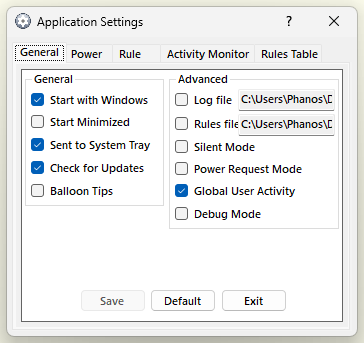
- Start with Windows
If selected AutoStandByPro will start up when the user logins. It is started like any other start of the program; see Running with administrator permission below.
- Start Minimized
If selected AutoStandByPro will start up minimized to the "System Tray".
- Sent to System Tray
If selected AutoStandByPro will be sent to system tray before executing an action.
- Check for Updates
If selected AutoStandByPro will check for updates every time it starts up.
- Balloon Tips
If selected AutoStandByPro will display tooltips as balloon tips.
Please note that this setting might not be available in all computers.
- Log File
Contains the location of the Log File that AutoStandByPro uses for logging purposes. If selected AutoStandByPro will ask you to specify a new location for the Log File and then it will move the Log File to the new location. If you wish to return the Log File to its default location then un-select this option. To open the Log File in Notepad, select “Log File” from the “Help” menu of the “Activity Monitor” window.
- Rules File
Contains the location of the Rules File that AutoStandByPro uses for storing the Rules. If selected AutoStandByPro will ask you to specify a new location for the Rules File and then it will move the Rules File to the new location. If you wish to return the Rules File to its default location then un-select this option.
- Silent Mode
If selected AutoStandByPro will suppress displaying any non-critical warning/error messages. Logging of these warning/error messages will still occur in the Log File.
- Power Request Mode
If selected AutoStandByPro will use an alternative more compatible way of detecting Power Requests from applications.
- Global User Activity
If selected AutoStandByPro detects user activity (mouse and keyboard input) in every user session on the computer, not only in the session it runs in. For example, if another user is signed in through Fast User Switching or Remote Desktop and is using the computer, that counts as user activity for the User triggers. This setting is on by default.
Activity in other sessions is collected by the AutoStandByPro background service. If the service is not available, AutoStandByPro uses the activity of its own session only. The service only shares this activity with a copy of AutoStandByPro that shows it a valid, signed Plus license; otherwise AutoStandByPro uses its own session only.
- Debug Mode
Used for troubleshooting purposes. If selected AutoStandByPro will generated a lot of debugging information in the Log File.
Running with administrator permission
Windows does not let a program that is not running with administrator permission see the mouse and keyboard in a window that is. Without it, if you work in an elevated window (for example a Command Prompt opened with "Run as administrator"), AutoStandByPro would not see your activity and the computer could go to sleep while you are working. For this reason AutoStandByPro runs with administrator permission.
- The first time AutoStandByPro starts, Windows asks for permission (the User Account Control prompt). Accept it. AutoStandByPro then registers a hidden task in the Windows Task Scheduler, named AutoStandByPro_ followed by your user name.
- Every start after that, from the Start Menu shortcut, the desktop shortcut, "Start with Windows" or the program file itself, runs that task, and you are not asked again.
- The "Auto StandBy Pro (Safe Mode)" shortcut works the same way: the start-up setting is saved first, then the task starts AutoStandByPro paused, without a prompt.
- Uninstalling AutoStandByPro removes the task.
- Only one copy of AutoStandByPro can run for each Windows user at a time. If you start it again while it is running, a message says so and the new copy closes. Look for the running copy in the system tray or the taskbar.
- If you decline the prompt, AutoStandByPro still runs, but without administrator permission: it will show a warning and will not see activity in elevated windows. Close it and start it again to be asked once more.
- If you move the program to another folder, or install a different copy, the task is updated automatically the next time you accept the prompt.
- If your Windows account is not an administrator account, Windows asks for an administrator's password each time, as it does for any program that needs administrator permission.