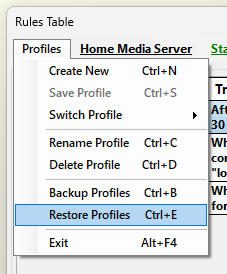
In order to restore a new set of "Profile(s)" please open the “Rules Table” window and from the "Profile" menu select “Restore Profiles”. On the new window navigate to the folder containing the file with the new set of profile(s) you wish to restore. Then select it and click on the button “Open”. If you wish to cancel the restore process please select “Cancel”.
If you have selected to continue restoring a new set of profiles(s) then AutoStandByPro will ask for confirmation before overriding the existing set of profiles(s) with the imported set. Click “Yes” to continue. If the restore was successful then a dialog box will appear stating that the restore was successful. By clicking "OK" the new set of profile(s) will be loaded to the "Rules Table" window.
Finally on the "Rules Table" window click on the "Apply" button and then at the prompt window choose "Yes" and then click "Ok". The restore process is now complete and the set of rule(s) of the active profile will be loaded to the kernel and the processing will start. If the restore was unsuccessful then a corresponding window will appear with a relevant message.